


Gliver completes the Guix desktop
There's a bit of irony in the title. At the time of writing, Gliver, a Guile based window manager for Wayland in the style of StumpWM and Emacs, isn't yet in Guix. There is, however, an open PR to add Gliver to Guix. However, what that patch is really waiting on is an upcoming release of Gliver which will solve many bugs.
Notably, that release will be 0.0.5. If that sounds early, Gliver
still is early. There are bugs, and you will probably have to file
issues for some that you discover. There are also some noticeable
missing features. But it doesn't matter. Gliver is everything I want
from a desktop experience, and I suspect for many of the kinds of
people who read my blog, it will be for them as well.
Gliver might not be for everyone. But if the following appeals to you: a live-hackable, written in Guile Scheme, tiling window manager which looks good, feels good, and whose codebase is understandable and, indeed, encourages you to understand and explore it, Gliver is for you.
Why I think Gliver matters
I think Anna Liberty's Towards Understandable Software is a must-read. Call it a counter-vision to the vibe bobsled. Anna lays out that software should be more understandable, not less, and easy to participate in even for people with no programming background. While Gliver doesn't itself try all the approaches Anna lays out, it is an understandable codebase.
Furthermore, Gliver is participatory. Gliver invites you to learn its internals and explore it. By default, Gliver's describe-key functionality opens a window where you can type the command you are thinking of, and it will show you what key it is bound to... but you can also type in a key sequence, and it'll show you what command that runs.
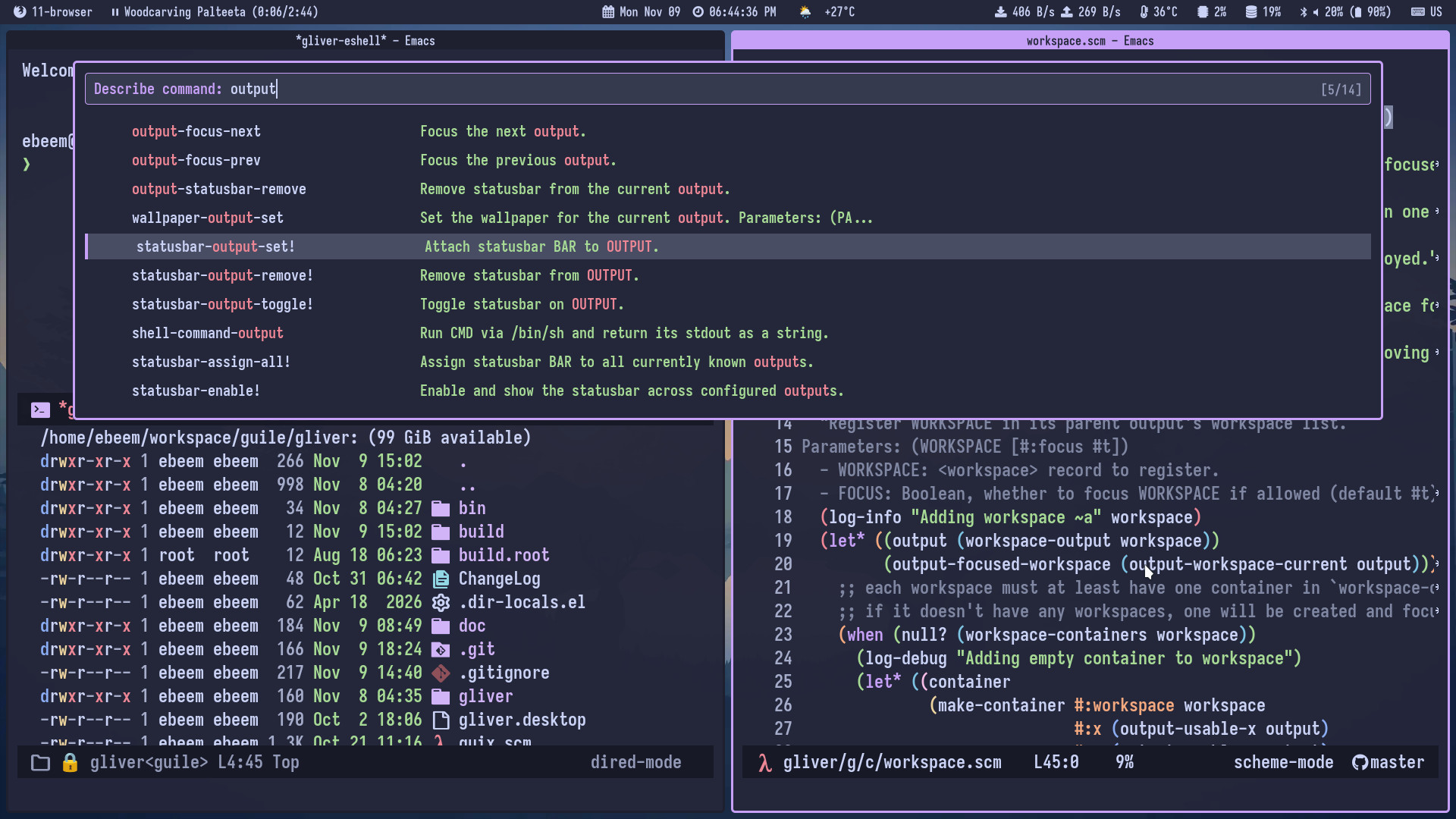
More than that, by default Gliver opens a unix domain socket in
~/.local/state/gliver/repl.sock. You can connect to this, say with
Geiser. You are live! You know that
command you just looked up with the above describe-key interface? Why
not try running it at the REPL! Hey, how does it work? Well Geiser
already has a feature for that; by default typing M-.
(geiser-edit-symbol-at-point) will jump you right to the definition,
and you can explore how that code works! You can run commands manually
at the REPL, you can inspect the state of the system, you can hack
away, you can take the useful things you have learned and add them to
your init.scm file so that the next time Gliver starts things are
more the way you want them than last time. But of course there's no
need to wait, this is a lisp style system! You can eval those changes
and apply them immediately and carry on your way.
Maybe this all sounds pretty technical, and even technically elite. And I think Gliver is probably not very accessible to non-scheme-hackers. But on the other hand, it could help you become a Scheme hacker.
When I started using Emacs, I was not a programmer. By extending Emacs, I became a programmer. (My background is not in CS; I was an interdisciplinary humanities student.) Emacs invites you to explore how it works by customizing it. My entire career would not have likely happened if Emacs did not welcome me into this process.
Gliver takes the same approach. But instead of Emacs Lisp, which is a hackable but honestly not really great lisp, it uses Guile Scheme, which is lovely. And notably, this is the same language as Guix.
There is more I want to say on this, and I will in a future article. In many ways I think Blender is also an interesting example of reflective software in action, and actually does expose some of the ideas such as visual programming for non-programmers in a way that Emacs and Gliver don't, with great success too. But that's to discuss later.
But as for the choice to switch. I have gotten tired of using systems that feel paternalistic, like they know better than I do. I have spent most of my days using GNOME, but without getting too much into it, I have been burnt way too many times by a paternalistic attitude which seems at the center of its design philosophy. When I did the latest upgrade and found out that custom application launcher shortcuts did not work anymore, and I could not figure out for the life of me why, I decided I didn't actually care to try to solve the problem this time. I was going to try something else.
Which is when I re-discovered Gliver. Thanks to ebeem for working on Gliver and jfred for having been an earlier adopter than I was and who helped me with some messy this-isnt-yet-packaged trickiness.
A bit more on Gliver before we wrap up
I suppose I've already said most of it, but a few more details. One interesting aspect of Gliver is that it uses River, which is a Wayland compositor which is designed as a framework for building window managers on top of. Building small window managers had become a lot harder to do with the move from X11 to Wayland; River provides a common foundation that makes it much more possible.
Gliver allegedly supports different tiling modes, but I don't use
them, I just use manual tiling. I like splitting up my screens the way
I like them. I know I want this thing here and that thing
there. Gliver shines at this kind of manual flow. It also has multiple
"tabbed" windows stacked in each pane of the frames (in Gliver, each
of those panes is called a "context"). You can move around what
workspace and context a window "belongs to" with
keybindings. Personally I bound <super>-x to be a keymapping with
sub-bindings for splitting things up with the same equivalent keys as
they are in emacs, since those mappings are burned into my brain.
The default theme is very nice. You can customize its colors but black and purple is exactly my jam already.
There are some rough edges. I have filed a number of issues for the things I've encountered. But one of the most noticeable is that there are several commands you might find for launching shell commands or creating new workspaces where you would expect to be prompted. For example, here's one of Gliver's commands for running a shell command:
(define-command (shell-process-spawn-detached cmd)
  #:interactive (string)
  "Spawn CMD via /bin/sh in a detached subprocess (double-fork)."
  (system (string-append cmd " &")))
Or for creating a workspace:
(define-command (workspace-create name)
  #:interactive (string)
  "Create a new workspace."
  (let ((output (output-current)))
    (when output
      (let ((workspace (make-workspace #:name (or name "New")
                                       #:output output)))
        (workspace-add! workspace)
        (log-debug "Workspace ~a created." (workspace-name workspace))))))
Nice, these look like good commands, let's bind them to keys in our config! But oh wait, nothing happens! That's strange, they work at the REPL, why don't they work when bound to a key?
The simple answer is that #:interactive (string) part you see above,
which indicates that Gliver's UI should be asking you for a prompt and
letting you type in something, simply isn't implemented yet! So when I
say there are some missing features, there really are some missing
features.
But this all may be changing very quickly. ebeem is working on a refactor of the GUI system to be more of a functional reactive programming type system, inspired by Flutter. When that lands, I expect a number of bugs to be fixed, and a number of missing features like the above to land.
This does lead to the funny situation that to create a new workspace, I have to do it at the REPL! That's okay. It'll be fixed, and for now, it's a nice reminder that running things at the REPL is something I can absolutely do at any time with Gliver, which I appreciate.
Speaking of the GUI, what GUI toolkit is it using, you may wonder? The answer is: it kind of has its own thing! Gliver has FFI bindings to Cairo for its vector graphics and Pango for fonts. That's it! It seems to be a good enough foundation for the rest it is using and doing.
Now, how am I running Gliver at all when it isn't in Guix? The funny thing is that for now, I am running out of a git checkout of Gliver. I start up and sacrifice the not-so-proverbial Cow window manager and replace it live with Gliver in a terminal like so:
killall -q cow; while true; do (killall -q gliver || true) && make run || sleep 3; doneWhich is basically the trick in the Gliver README, just starting with a cow sacrifice first. Pretty ugly though, it'll be nicer when Gliver is just packaged in Guix.
Departing thoughts
Gliver is nice. It feels good, it works well. And it's participatory, understandable software. It's also very early. It might not be for everyone, but it has elements of a vision for a future I'd like to see for everyone.
If you like the idea of a scheme'y lisp machine using Guix as your operating system distribution but have found that the desktop experience was missing, well, Gliver is now here! And soon, packaged in a Guix near you.
And, I suspect, once it is... well, we'll be seeing most of the Guix community moving over. It's too exciting and too nice not to!
